Posts

Gradle finding out of date dependencies

Ever wondered how to find dependencies that are no longer up to date in Gradle? Well Ben Manes has the plugin for you in the Gradle Versions Plugin . I'm not going to detail how to use it, it is plainly documented on his site, needless to say ensuring that your dependencies are as up to date as possible is crucial to managing your software, if you don't know that the libraries are out of date then you can't make sensible decisions on your software versioning.

Useful Gradle Build Process Plugins

Gradle is a great tool for building Java projects, in my opinion it is much better than its only real competitor Maven . A lot has been written about Gradle especially with comparison to Maven and building with it, I'm not really going to cover that. What I am going to do is highlight a few plugins which I find invaluable when putting a Gradle script together for a Java project. Release Management Maven has the well known and well publicised 'Maven Release Plugin' , but what is there for Gradle? Well there are a few options out there (search for gradle release plugin) but for me the best one is the Axion Release Plugin . This nicely separates the release management from the building of the software, in addition the versioning is controlled by the source control system tags rather than in Maven where it goes and edits the XML files and has to push these back to the repository. Distribution Ever struggled with the question 'How should I distribute my Java ap...

Loading a List from a file in Spring Application Context

Have you ever wanted to load a List in your application context from a file? Perhaps you want to define a variable number of settings to be injected in, or in my case I wanted to pull in the Hibernate mapping files into an AnnotationSessionFactoryBean. Spring doesn't appear to have a way to do this out of the box, so here is how I have done it. So you want to load a list of strings defined in a file called names.txt such as: James Adam Peter Paul Your application context would look something like: <bean id="resourceList" class="com.fizzpod.spring.ResourceListFactoryBean"> <property name="targetListClass"> <value>java.util.ArrayList</value> </property> <property name="locations"> <list> <value>classpath:names.txt</value> </list> </property> </bean> The ResourceListFactoryBean is (obviously) a factory bean for creating a list from a Spring resource. Now this...

Simple Notepad Version 1.4

Image
Version 1.4 is out and as normal my methodology of trying to do frequent releases means the list of new features is short so short it is a single feature. What is it? Well now you can copy selected text from any page into a note. How? it's as simple as selecting the text and right clicking to get a context menu. It's not just for selecting text though, you can also just right click on a link and copy that to a note as well as just right clicking on a page and you get the title of a page and the url. Simple. This time there is a catch... The context menus are only available in version 6 of chrome. So this means that Simple Notepad no longer works in chrome 5, sorry for all the chrome 5 users but progress marches on.

Simple Notepad Version 1.3.0

Image
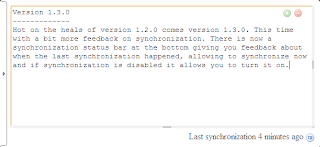
Hot on the heals of version 1.2.0 comes version 1.3.0. This time with a bit more feedback on synchronization. There is now a synchronization status bar at the bottom giving you feedback about when the last synchronization happened, allowing to synchronize now and if synchronization is disabled it allows you to turn it on.

Simple Notepad Version 1.2.0 - Resizable

Image
New version. So What's changed? You can now resize the note area to what ever size you want give it a go...

Simple Notepad Version 1.1

Image
I've just released the latest version of Simple Notepad. So what's new? To be honest it's only a single feature: Cursor/selection memory; when you leave your note and go back to it the cursor/selection is still present, even when you change note and go back to it the cursor is just where you left it. My hope with this (as with everything with Simple Notepad) is that it is so simple that you don't even notice it, but it should really enhance the usability of Simple Notepad.